


Maximize classroom learning, increase student engagement and improve staff performance.
Sharp multifunction document systems can help administrators streamline document processing and enhance collaboration in the classroom.
Automated Grading Allows More Time for Teaching
With Remark®, an automated grading solution from Sharp Partner Program member Gravic®, teachers can easily scan tests on a Sharp multifunction printer (MFP) and quickly review the results from their desktop.
Achieve Greater Flexibility with a Learning Management System
Students and teachers can collaborate and share content more efficiently using Sharp MFPs and BlackBoard Learn™, a virtual learning and course management system. With the available Sharp connector, students can scan and submit assignments using any Sharp MFP on campus. 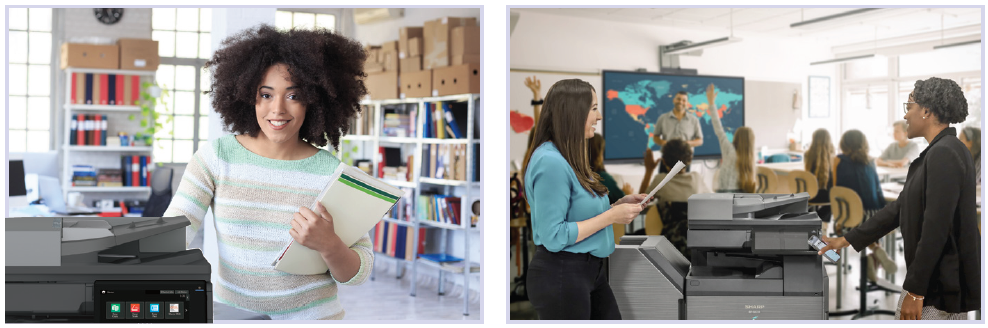
Centrally Managed Printing Helps Lower Costs
Sharp, in coordination with our authorized resellers, offers easy-to-use print management solutions to help administrators lower their costs. Accounting systems such as PaperCut MF™ and Pharos® Uniprint® deliver seamless integration with Sharp document systems and can charge student accounts for print costs based on their login credentials.
Collaborate and Share Files with Popular Cloud Services
Easily share information with students and staff using popular services such as Microsoft® Teams, Dropbox, Google Drive™ and others.
Leading-Edge Security Helps Keep Your Files Safe
Multi-layered security features built into Sharp MFPs, such as system integrity check, real-time intrusion detection and available antivirus powered by Bitdefender help protect confidential information, and can also help meet and maintain regulatory compliance, such as HIPAA and FERPA. 
Case Study
Macon County Schools
Business Challenges
Macon County Schools had a fleet of old, unreliable copiers and printers. The machines had inconsistent print quality, many service issues and it was difficult for the schools to keep track of print-related costs.
Technology Solutions
Sharp specialists conducted a print environment assessment across the 11 schools. The outdated fleet was refreshed to match output volume needs. The new devices were strategically placed to ensure best access for employees and the old print management software was replaced with Papercut™.
The solution included the following:
• 80 Sharp MFPs
• 53 Sharp printers
• Papercut™ print management software
Proven Results
After switching to Sharp, device uptime and productivity increased substantially. Due to Sharp’s reliable supply chain, service has never been faster. “I have received nothing but positive feedback from school members. I think the Sharp team did a really good job at getting the school staff trained,” said Tim Burrell, IT Director at Macon County Schools.
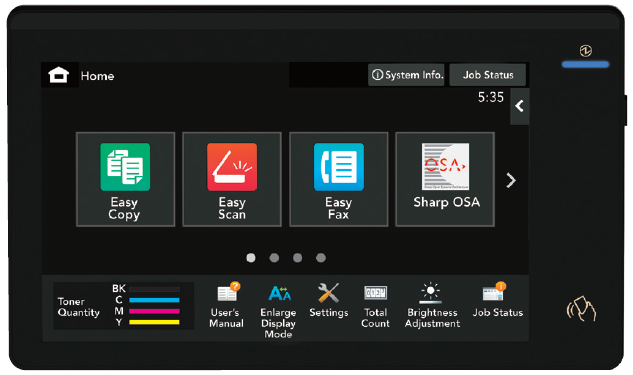
Sharp’s user-friendly touchscreen display is customizable for convenience and common among 30+ other models.
Easy-to-Use
Sharp MFPs are designed with an intuitive operation panel that delivers a responsive, accurate user experience. The flat touchscreen provides good visibility in bright light and is easy to wipe clean of allergens.
Full Function Capability
All models offer strong multifunction features, including copying, printing, and network scanning. Access to popular cloud services such as Microsoft® Teams, Google Drive™, Dropbox and others are available on most models.
Network Friendly
Integrates seamlessly with today’s modern education environments and supports the latest communication and security protocols. Most models also offer optional Bitdefender antivirus protection.
Designed to deliver performance and productivity.
• Built-in retractable keyboard on most models simplifies email address and subject line entries.
• Enhanced touchscreen delivers an accurate, responsive user experience and provides easy access to features.
• Easy student collaboration with walk- up access to popular cloud applications on most models such as Microsoft® Teams, Google Drive™, Dropbox and others.
• Automatic Firmware Updates help ensure MFP settings and features are always up to date.
• Supports popular mobile technologies, including Apple® Airprint® and Android™ Print Framework.
• Compact PDF scanning feature reduces the file size of scanned color documents, resulting in decreased network traffic and more efficient use of disk and cloud storage.
• With the Sharpdesk® Mobile app, users can securely connect to Sharp MFPs via wireless networking from smart phones and tablets, providing a consistent mobile printing and scanning experience across the organization.
• Standard duplexing document feeder on most models can scan both sides of a document in a single pass, saving time and putting less wear on the machine.
• Strong multi-layered security such as system integrity check, intrusion detection and optional Bitdefender antivirus help protect your data.
• Serverless Print Release feature available on most models enables users to securely print a job and release it from up to ten Sharp MFPs anywhere on campus.
• Supports Microsoft Universal Print, enabling students and teachers to adapt to this popular cloud service.
• Sharp Remote Device Manager simplifies device monitoring and management with event-driven alerts to help maximize uptime.